What Is a UV Laser Printer and How Does It Work?
The term “Uv Laser Printers” can sound straightforward, but the technology deserves careful explanation. In industry, it may describe a printer using ultraviolet laser energy to create images, marks, or patterns on a surface. It can also be confused with UV inkjet printers, which use UV lamps or LEDs to cure liquid ink. These systems are not identical. That distinction matters when comparing print quality, operating costs, and material compatibility.
A UV laser printer directs a tightly focused ultraviolet beam through mirrors, lenses, or scanning components. The beam changes a controlled area of the material. Depending on the machine, it may cure a photosensitive coating, remove a surface layer, or form a permanent contrast mark. Some systems work with plastics, coated metals, glass, ceramics, and selected films. The result can be extremely fine, sometimes visible as crisp lettering on a small product surface. It feels almost surgical.
The process begins with digital artwork or variable data. Software converts that information into movement and laser-control instructions. The printer then adjusts speed, pulse duration, focus, and power. Those settings influence edge sharpness, color appearance, heat exposure, and durability. Operators must test them for each substrate. A setting that works on acrylic may produce weak contrast on anodized aluminum.
I should note that “laser printer” does not automatically mean faster or better. Maintenance, ventilation, calibration, and operator training still affect reliability. Real-world performance depends on the material, workflow, and application. Understanding these limits helps buyers evaluate UV laser printers with practical expectations rather than attractive specifications alone.
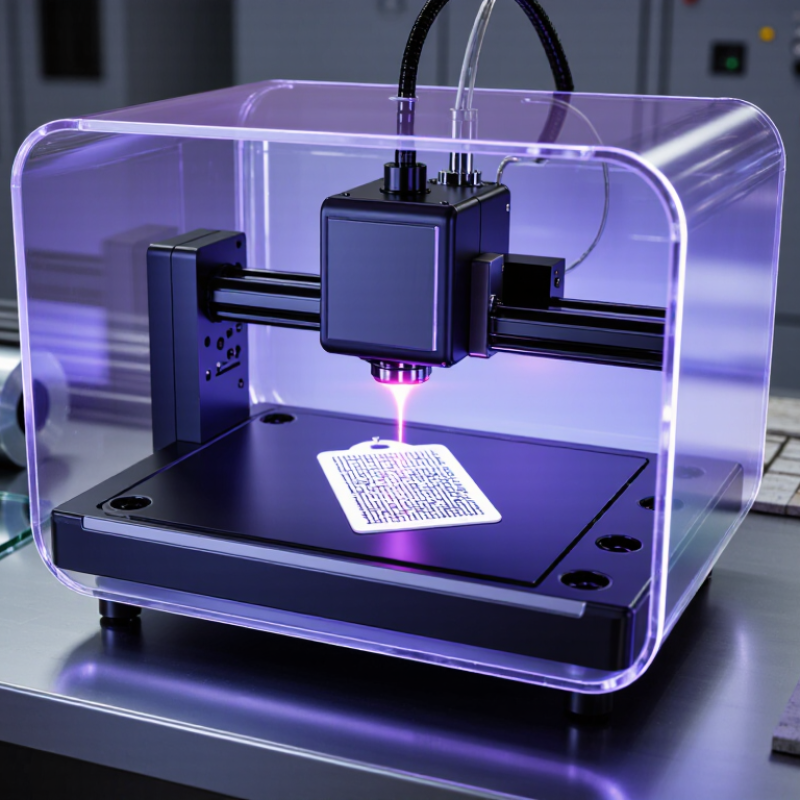
Definition and Core Features of a UV Laser Printer
A UV laser printer is a digital marking system that uses ultraviolet laser energy to create text, codes, patterns, or fine images on a surface. Unlike an ordinary inkjet printer, it usually does not spray liquid ink. The laser removes, changes, or lightly carbonizes the upper material layer. This process is often called cold marking because UV energy produces less heat than many infrared lasers.
The core feature is a short-wavelength UV beam, commonly near 355 nanometers. Its compact energy spot supports sharp details, small characters, and narrow lines. No ink is involved.
A scanning mirror guides the beam across the work area, while control software converts digital artwork into timed laser movements. UV systems can mark plastics, coated metals, glass, ceramics, and some sensitive electronic parts. Results depend on surface color, coating thickness, speed, and pulse settings.
Non-contact operation reduces tool wear and limits surface pressure. Many systems also include enclosed work areas, fume extraction, focus controls, and safety interlocks. These features improve repeatability, but they do not remove the need for trained operation. Some surfaces may discolor unevenly or crack under excessive energy. The term “UV laser printer” can also confuse buyers, since some sellers use it for UV inkjet equipment. Checking the light source, material process, and maintenance requirements is essential. The technology is precise, yet not universally suitable.
How UV Laser Printing Works Step by Step
What Is a UV Laser Printer and How Does It Work?
How UV Laser Printing Works Step by Step
UV laser printing begins with digital artwork converted into controlled scanning paths. The printer checks the material, surface height, and required marking depth. A UV laser then produces short-wavelength light, commonly near 355 nanometres. Galvo mirrors guide the beam across the surface. The beam reaches one tiny point at a time.
At each point, ultraviolet energy breaks molecular bonds or removes a thin surface layer. This creates contrast without traditional ink. Some materials darken through photochemical change, while others reveal a lighter underlying layer. Air extraction removes fumes and particles. A focus sensor keeps the beam at the correct distance. Even a small height error can blur fine text.
Technicians usually test a sample before full production. They adjust pulse energy, speed, frequency, and hatch spacing. Excessive energy may burn edges. Too little energy may create weak marks. That trade-off is easy to underestimate. A 2024 Grand View Research report valued the global laser marking machine market at approximately 3.3 billion US dollars in 2023, with continued growth forecast through 2030. MarketsandMarkets also projects strong expansion for laser marking applications through 2028. These figures include several laser types, not only UV systems. Therefore, they indicate wider industrial demand rather than precise UV printer sales. Material testing remains essential, especially for coated plastics, glass, films, and heat-sensitive components.
What Is a UV Laser Printer and How Does It Work?
UV laser printing uses short-wavelength ultraviolet light to create precise marks by selectively removing, modifying, or curing material on a surface. The chart compares common ultraviolet laser wavelengths used in precision marking and processing.
How UV Laser Printing Works Step by Step
- Digital preparation: Artwork, text, or machine-readable codes are converted into scanning instructions.
- UV light generation: A laser source produces ultraviolet pulses, commonly at wavelengths such as 355 nm or 266 nm.
- Beam control: Mirrors or a galvanometer scanner direct the focused beam across selected points on the material.
- Surface interaction: UV photons can break molecular bonds, ablate a thin layer, or trigger localized chemical changes with limited heat transfer.
- Image formation: Repeated laser pulses build the final text, graphic, or code with high positional precision.
- Inspection: The printed result is checked for contrast, alignment, legibility, and surface quality.
Photon energy increases as wavelength decreases. The values shown are calculated using E = 1239.84 ÷ wavelength, where E is measured in electronvolts and wavelength is measured in nanometers.
Materials, Applications, and Print Quality
What Is a UV Laser Printer and How Does It Work?
A UV laser printer uses focused ultraviolet light to mark or remove a material’s surface. Some systems operate near 355 nanometers. Unlike UV inkjet equipment, they may not use liquid ink or curing lamps. The beam creates contrast through ablation, color change, or controlled surface damage. The term “printer” is imperfect here. Many units function more like precision marking systems.
Material selection controls the result. Coated metals can produce sharp, pale marks after the top layer is removed. Plastics may need lower pulse energy to avoid melting. Glass and ceramics often require careful focus and slower scanning. Transparent films can be difficult because the laser may pass through them. In production, technicians should test several samples, inspect edges under magnification, and measure contrast after cleaning. Small settings matter.
Applications include electronics, packaging, laboratory components, and industrial parts. Typical marks include serial numbers, dates, symbols, and two-dimensional codes. Grand View Research’s UV Printing Market report for 2024–2030 describes the broader UV-printing market as a growing, multibillion-dollar sector, with double-digit annual growth expected. Smithers’ digital packaging print research also reports strong expansion in variable-data and short-run production. These trends support laser adoption, but they do not guarantee better quality. Spot size, pulse width, scan speed, surface coating, and operator experience still determine readability. A fast line is not always a clean line.
Advantages, Limitations, and Safety Considerations
What Is a UV Laser Printer and How Does It Work?
A UV laser printer uses ultraviolet light to create precise marks or images on selected surfaces. Depending on the design, the laser may expose a coating, alter the material, or cure a light-sensitive layer. The result can be sharp text, fine patterns, and strong contrast. UV energy works without direct contact. It can also reduce smearing on suitable materials. In practical workshop use, this precision is valuable for labels, panels, instruments, and small product details. The finish often looks clean under bright inspection lighting.
Advantages, Limitations, and Safety Considerations
The main advantages are accuracy, repeatability, and compatibility with many rigid surfaces. Marks may resist moisture, handling, and mild chemicals. However, performance depends heavily on the material. Some plastics discolor, glossy surfaces reflect unevenly, and heat-sensitive items may warp. Equipment and maintenance costs can also be significant. It is not a universal solution. That assumption causes avoidable waste. Results should be tested on the actual substrate before production.
Tips: Keep the protective cover closed during operation. Never view the laser path directly or through reflective tools. Use approved eyewear when the equipment requires it. Provide suitable ventilation, especially when coated materials produce fumes. Check interlocks before each work session, and keep the work area free from polished scrap. Record power, speed, and surface settings. Small records improve repeatability. Safety procedures should follow the equipment manual and applicable workplace requirements.



 Send Email
 18929582815