Leave Your Message
Fiber Laser Marking Printers have become important tools for permanent identification, traceability, and branding across industrial production. Their 1,064-nanometer wavelength suits many metals, including stainless steel, aluminum, and coated components. They can create sharp serial numbers on small parts, even when production lines move quickly. However, the “top” printer depends on the material, marking depth, cycle time, and compliance requirements.
Market data supports this growing interest. MarketsandMarkets reports that the global laser marking market is projected to expand from approximately USD 3 billion in the early 2020s, with steady annual growth through 2028. Fortune Business Insights also identifies automation, electronics manufacturing, and automotive traceability as major market drivers. These reports indicate opportunity, but they do not prove that every premium machine fits every factory. Rankings require practical testing.
Important details are easy to overlook. A 20-watt source may suit surface marking, while deeper engraving can require higher power and slower passes. Lens size changes the marking field. Galvo speed affects productivity, but not always readability. Operators should inspect sample contrast, edge sharpness, software stability, maintenance access, and warranty support. ISO-based quality systems also make repeatable settings and documented verification valuable. A low purchase price can hide integration costs. Any comparison has limits. Therefore, this guide evaluates Fiber Laser Marking Printers through measurable performance, application fit, reliability, safety design, and total ownership cost. The final choice should follow verified samples, not advertising claims alone.
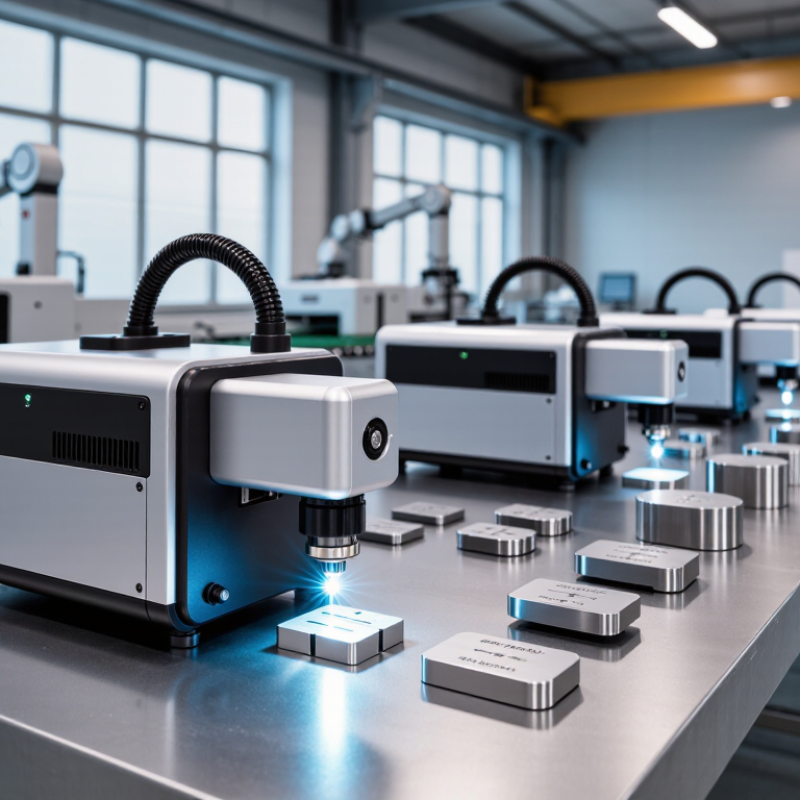
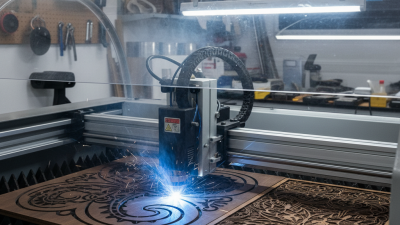
A fiber laser marking printer is not an ink printer with a different cartridge. It is a computer-controlled marking system that uses a fiber-optic laser source, mirrors, and software. The beam usually operates near 1,064 nanometers. It heats a precise surface area, creating contrast through annealing, engraving, or controlled material removal.
In practical use, an operator places a metal nameplate under the lens. The software guides the beam across each letter, often within seconds. These systems commonly mark stainless steel, aluminum, coated metals, engineering plastics, and some electronic components. Marking depth and contrast depend on power, pulse duration, focus, and surface chemistry. A shiny part can still produce a weak result if the settings are poorly matched.
Industry data supports growing interest in this technology. MarketsandMarkets estimated the laser marking market at about USD 3.0 billion in 2023, with growth toward approximately USD 4.4 billion by 2028. Grand View Research reported that the global fiber laser market was valued at roughly USD 5.3 billion in 2023. These figures indicate expanding industrial adoption, not guaranteed savings for every workshop. That assumption needs testing.
A reliable printer should offer repeatable focus, stable beam quality, traceable settings, and suitable enclosed safety controls. The right choice depends on material, marking speed, line width, and production volume. More power is not automatically better. Test samples matter. Report sources: MarketsandMarkets, Laser Marking Market; Grand View Research, Fiber Laser Market, 2024.
| Laser Marking Printer Type | Typical Laser Source | Common Power Range | Best-Suited Materials | Typical Marking Speed | Marking Characteristics | Recommended Applications |
|---|---|---|---|---|---|---|
| General-Purpose Fiber Marker | Q-switched or pulsed ytterbium fiber laser | 20–50 W | Stainless steel, carbon steel, aluminum, brass, copper, engineering plastics | Up to approximately 7,000 mm/s, depending on the scanner, lens, and settings | High-contrast permanent marks with low maintenance requirements | Part identification, serial numbers, logos, barcodes, and QR codes |
| Compact Desktop Fiber Marker | Air-cooled pulsed fiber laser | 20–30 W | Metal nameplates, tools, small mechanical parts, coated plastics | Approximately 2,000–6,000 mm/s | Small footprint and easy integration into workbenches or inspection areas | Prototype work, workshops, laboratories, and low-to-medium production volumes |
| High-Power Fiber Marker | High-power pulsed fiber laser | 50–100 W | Steel, stainless steel, aluminum, titanium, copper, and deeper metal surfaces | Approximately 3,000–8,000 mm/s | Higher energy per pulse for faster processing and deeper engraving | Industrial traceability, tooling, automotive parts, and heavy components |
| MOPA Fiber Marker | MOPA ytterbium fiber laser | 20–60 W | Anodized aluminum, stainless steel, plastics, coated metals, and sensitive surfaces | Approximately 2,000–7,000 mm/s | Adjustable pulse duration helps control color, contrast, heat input, and surface finish | Black marking on aluminum, color marking on stainless steel, and fine graphics |
| Deep-Engraving Fiber Marker | High-energy pulsed fiber laser | 50–100 W | Steel, stainless steel, hardened metals, molds, dies, and industrial tooling | Approximately 500–3,000 mm/s for deeper engraving operations | Designed for repeated passes and material removal rather than only surface contrast | Serial plates, cavity identification, molds, dies, and wear-resistant markings |
| Integrated Production-Line Marker | Pulsed fiber laser with industrial control interface | 20–60 W | Metal components, painted parts, coated products, and selected plastics | Determined by line speed, part handling, and required mark quality | Supports automation, sensors, encoders, databases, and inline verification | High-volume manufacturing and automated traceability systems |
| Portable or Handheld Fiber Marker | Compact pulsed fiber laser | 20–50 W | Large metal assemblies, pipes, frames, machinery, and irregular components | Usually lower than fixed-position systems because positioning is manual | Flexible access to oversized or difficult-to-move workpieces | On-site maintenance, large-part marking, repair operations, and field service |
| Three-Axis Fiber Marker | Pulsed fiber laser with dynamic focusing | 20–60 W | Flat, curved, recessed, and uneven metal surfaces | Varies according to surface geometry and focal adjustment requirements | Maintains focus over greater height variation than a standard flat-field system | Curved components, cylindrical parts, formed metal products, and recessed areas |
| Ultrafine-Detail Fiber Marker | Short-pulse or precision-configured fiber laser | 10–30 W | Fine stainless-steel parts, electronics housings, jewelry metals, and precision components | Approximately 500–5,000 mm/s, depending on resolution and detail | Small spot sizes and controlled heat input support detailed graphics and microtext | Electronics, medical components, precision tools, and small engraved products |


 Send Email
 18929582815