Small businesses often mark products in the middle of real work: a batch number on a cardboard box, a date on a glass jar, or a logo on a kraft-paper bag. The printer must fit that work—not the other way around. Handheld Inkjet Printers can offer flexible, on-demand marking without a fixed production line, but print quality depends on the surface, ink, and operator technique.
The U.S. Small Business Administration’s Office of Advocacy reports that small businesses account for 99.9% of U.S. businesses. That scale makes practical equipment choices matter. Smithers’ research on inkjet printing also tracks the technology’s expanding use across print applications, while reminding buyers that “inkjet” covers very different systems. For a small maker, a printer that handles a slightly textured carton may be more useful than one with an impressive speed claim.
A useful test is simple. Print on your actual packaging. Check the result after it dries, then handle the package as customers will. Look for readable codes, steady alignment, and clear operating instructions. One detail is easy to miss: a low-cost device can still waste time if its ink struggles with your materials.
I could not verify a public, attributable quotation from a named handheld-inkjet specialist, so I won’t invent one. This guide instead compares features that small businesses can test directly, including print height, compatible surfaces, cartridge cost, and ease of use. The best choice is rarely the flashiest. It is the one that works reliably on your own products.
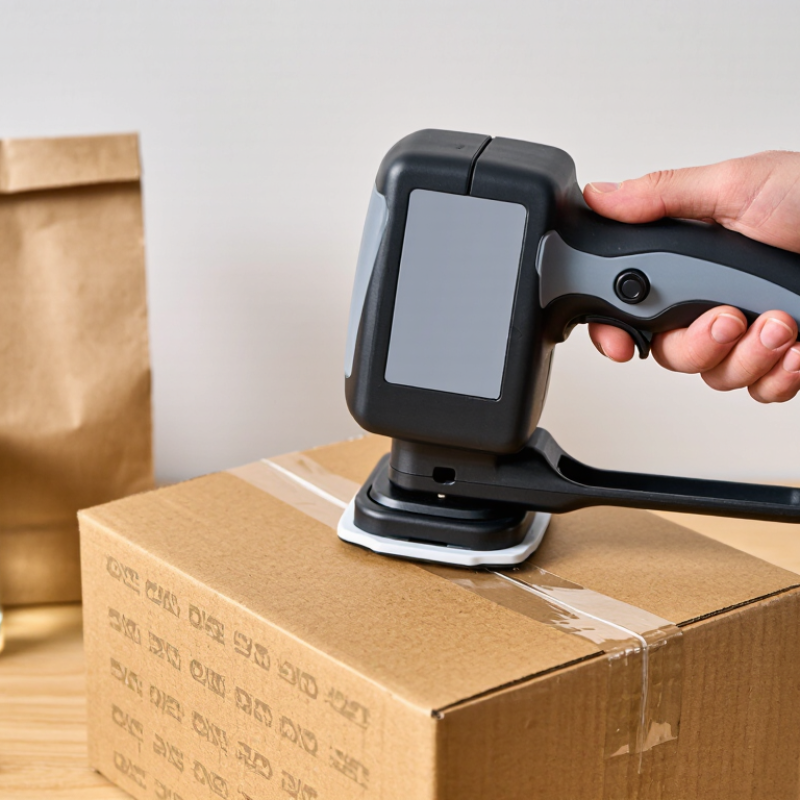
A handheld inkjet printer is a portable tool for marking cartons, bags, pipes, and other surfaces. The operator guides it across an item while a sensor tracks movement. Inside, a printhead releases tiny ink droplets through carefully timed nozzles. The selected message appears as the device moves. It may include a date, batch code, short text, or simple graphic. Unlike a fixed production-line printer, it can reach awkward spots and handle short runs. But print quality depends on steady movement, suitable ink, and a compatible surface.
Inkjet printing is part of a large industry: Grand View Research estimated the global inkjet printer market at about US$44.4 billion in 2023. That figure covers many printer types, not handheld units alone. It signals broad adoption, but it does not prove every small business needs one. For a busy packing bench, a clear code can save repetitive handwriting. Still, placement and legibility need regular checks; speed can make mistakes easier to miss.
Top Handheld Inkjet Printers for Small Businesses
Key Features Small Businesses Should Compare
A handheld inkjet printer should match your materials, workflow, and staff—not just promise fast printing. Compare supported surfaces, including cardboard, plastic, glass, and metal, then test the actual packaging you use. Check print height and resolution against your needs: bold lot codes need less detail than compact barcodes. GS1’s General Specifications set barcode requirements, while ISO/IEC 15416 describes print-quality grading for linear barcodes. A clear-looking code is not always a scannable one.
Speed matters, but so do setup and upkeep. Compare battery life, ink-cartridge changes, drying time, and how easily operators adjust dates or batch codes. Ask whether the device stores commonly used messages and can print reliably on curved or dusty surfaces. The SBA Office of Advocacy’s 2024 Small Business FAQ counts 34.8 million small businesses in the United States. For teams with limited time and space, simple controls and predictable consumable costs can matter more than rarely used features. I would not choose on advertised speed alone; real-world handling can be messier.
Tips: Test on your own packaging. Print several codes, let them dry, then scan them under ordinary lighting. Check ink costs per usable print, not just cartridge price. Keep one spare cartridge nearby. Test before buying.
Typical maximum print-height options for handheld TIJ printers
Print height is one useful specification to compare alongside print resolution, supported surfaces, ink type, battery life, and ease of changing settings. These are common print-height options, not a ranking; availability varies by model.
Small businesses need handheld inkjet printers that fit real workspaces, not idealized production lines. A market stall may mark kraft boxes, while a repair shop labels parts beside a crowded bench. The U.S. Small Business Administration Office of Advocacy’s 2024 Frequently Asked Questions reports that small businesses represent 99.9% of U.S. businesses. Their workflows vary widely. Match the printer to the surface, print volume, and operator’s grip. A lightweight unit with clear controls can reduce fatigue during repeated carton marking.
E-commerce also shapes these needs. The U.S. Census Bureau reported 2023 retail e-commerce sales of $1.1187 trillion, or 15.4% of total retail sales. For small sellers, that means frequent parcel preparation and changing shipment details. Look for adjustable text height, readable date codes, and ink suited to the material. Check cartridge cost and availability, not just the printer’s purchase price. Then test on your actual boxes. Ink can feather on rough cardboard or smudge before drying; specifications rarely show that clearly. A simple test may feel slow, but it can prevent mislabeled stock. Don’t overbuy. A high-speed model may add little value when daily output is modest.
A bakery marking best-before dates on paper bags needs different features from a workshop labeling plastic bins. For porous surfaces, choose ink suited to absorbent material and text that stays readable at the actual print size. Small date codes can blur when printed too quickly. Test a sample bag before committing to a layout. It takes only minutes.
For cartons moving through a packing area, prioritize a comfortable grip, steady trigger response, and a battery that lasts through a typical shift. A wider print head can fit batch codes or short handling notes, while a compact model may suit narrow labels and crowded workbenches. Check the supported print height against the characters staff actually need; tiny text is rarely useful at arm’s length. This is easy to overlook.
Retail shops often need quick price or shelf-label updates, so a clear display and simple text entry may matter more than maximum print speed. For coated labels or smooth containers, verify ink compatibility and drying time on the exact surface. I would test several items under normal handling conditions, since a code that looks sharp on a clean sample may smudge after a worker stacks the goods. Also consider cleaning and cartridge changes: even a capable printer can become a nuisance if routine upkeep interrupts a busy shift.
Compare common handheld printer configurations by the jobs they are suited to. Specifications are typical ranges; actual performance depends on the printer, ink, surface, and operating conditions.
| Business task | Suitable printer capability | Typical print details | Common surfaces | What to check before buying |
|---|---|---|---|---|
| Adding lot codes and dates to packaged goods | Thermal inkjet (TIJ) with quick-drying ink options and editable date or batch fields | Usually one or two lines of text; print height commonly around 12.7 mm per cartridge | Coated cartons, labels, and some non-porous packaging, subject to ink compatibility | Confirm ink drying time, rub resistance, and whether the print remains legible on the actual packaging. |
| Marking cartons with handling or shipping text | Larger-print-height handheld system or a multi-pass configuration for larger messages | Large characters and short messages; maximum print height varies by device, often from about 12.7 mm to several times that amount | Corrugated cardboard and other absorbent carton surfaces | Check the supported print height, nozzle-to-surface guidance, and readability on rough or uneven cardboard. |
| Printing barcodes for inventory or internal tracking | Printer with barcode-generation support, consistent positioning, and suitable print resolution | Linear or 2D codes can be supported; successful scanning depends on code size, contrast, surface, and print quality | Flat labels, cartons, and smooth packaging surfaces | Test printed codes with the scanners used at the business; do not rely on resolution claims alone. |
| Adding short product or batch information to containers | Handheld TIJ unit with ink formulated for the container material and a guide or roller for steadier movement | Short text and simple codes; curved surfaces may need slower, controlled passes | Plastic, glass, or metal containers when compatible ink is available | Verify adhesion and drying on the exact material; surface coatings and condensation can affect results. |
| Printing variable information on labels | Compact handheld printer with reusable templates and editable text fields | Small text, dates, batch references, and simple graphics; many TIJ systems offer resolutions in the 300–600 dpi range | Paper and synthetic labels, depending on ink and label coating | Check template import, font-size limits, and legibility at the intended label size. |
| Marking wood, metal, or other workshop materials | Handheld unit with ink specifically rated for the target surface; use a positioning aid where repeatability matters | Short identifiers, dates, or simple codes; results vary substantially with surface texture and porosity | Wood, coated metal, and selected finished surfaces after compatibility testing | Run adhesion and abrasion tests on a sample piece before marking saleable or regulated goods. |
Selection note: Match the ink to the substrate and production environment. Print speed, resolution, print height, and drying time are device- and ink-dependent; test representative samples before committing to a workflow.
Choosing a handheld inkjet printer starts with the surface, not the feature list. A carton, plastic pouch, and metal part can need different ink and drying times. Test a sample on the actual material before buying. Check whether the printer can produce readable text at your required size and speed. Also consider weight, battery life, and how easily operators can replace cartridges. A light device may feel better during a long shift, but its controls still need to work with gloves.
There is no perfect setting for every job. A printer that works well on clean cardboard may struggle with dusty or curved surfaces. That limitation is easy to overlook. Ask for practical demonstrations, and judge the print after it dries, not just when it first appears. A little trial and error is normal.
For maintenance, follow the manual for the specific ink and cartridge. Wipe the printhead gently with a suitable lint-free cloth, and never scrape the nozzle. Keep cartridges capped when they are not in use. Print a short test pattern before a busy run. Clean and dry the package surface, then hold the printer at a steady angle and distance. Small habits matter. If print quality drops, pause and check the nozzle, ink level, and surface before changing several settings at once. Record what worked; memory gets unreliable during a rushed shift.